

I’ve shared my three setups with you over the last year, but today I’m going to talk about some awesome gaming accessory ideas for your own setups.
So if you’re looking for something for yourself or maybe a gift for someone else, hopefully today’s blog will be useful. I play on the PS5 and Xbox Series X but most of these accessories will be suitable for PC too. Everything I mention today is linked below each section.
Plates and Skins

If you want to customise the look of your consoles you have got to check out dbrand. I bought the PS5 Dark Plates from them earlier this year, and I think it looks great. They aren’t official Sony plates, but these are a great alternative. The original white plates just pop off and you can replace them with these black ones instead.
For other consoles like the Xbox Series X and Switch they sell skins or vinyl wraps you can install. These are pretty cool and completely transform the way your console can look.
Buy from here: USA / UK
Lights

I’ve always added lights to my setups, and it doesn’t matter whether you’re playing on a TV or monitor, it completely transforms the look. You can either add bulbs or LED strips.
Some light strips show one colour at a time, while others like LIFX and Philips Hue will show a mixture of colours in one go. I use the LIFX Z Strips behind my TV.
You can even install colour changing strips which react to what’s on your TV. Philips Hue does this as well as Govee. I’ve used the Govee TV kit which comes with a mini camera that syncs with the image on screen. The camera is a little bulky and ugly, but if you don’t mind seeing it the results are really impressive.
Failing that, if you don’t want to use LED strips, you can get light bars. These can be mounted to the back so they are out of sight, or can be placed on your table top. Either way they look great.
All of these lights can be integrated with Google or Alexa and have apps to control the colours and themes you’re using. Depending on the brand you go with, they will cost around £50 for a starter kit.
Buy from here:
Controllers

Having more than one controller is massively underrated, especially if you play wirelessly. If you’ve ever had a long gaming session and find your battery running low, you’ll wish you’d had another one ready to go. Or if you’re playing local co-op games with friends and family you’ll need a second controller anyway. Not only that, but both the PlayStation and Xbox have a few different choices now for colours and designs, so you don’t have to stick with the standard colours.
And even if there isn’t a colour you like, you could grab yourself a SCUF controller and design it the way you want, or you’ve got the Xbox Design Lab and ColorWare.
The official ones cost around £55 to $65.
Controller Docks
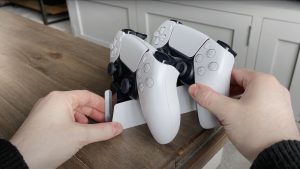
When it comes to charging the controllers, of course you could use a USB cable and plug it into your console, or you could use a charging dock. Sony has an official one which allows you to dock 1 or 2 controllers at a time. The official colour is white, although I had mine painted black to match my setup. These are £25 or $30, but there are cheaper versions out there if you’re not too fussed about the brand.
For the Xbox I’d recommend the PowerA dock. I think this is one of the nicest looking docks out there. It comes with rechargeable batteries to fit into the Xbox controller, then they just slot onto the dock. There’s even a small LED light underneath so you know when it’s charging. These are around £20 or $25.
Controller Stands

If you want something totally different to show off or mount your controllers though, I’d go for a wooden stand from GeekMadeDesigns. It allows you to display your controllers in a totally different way. They make them for the Xbox and PlayStation and they have different designs and colours to choose from.
Depending on the size or number of controllers you need to mount, the price varies. But these are around £50 or $60.
Buy from here: USA
Headsets
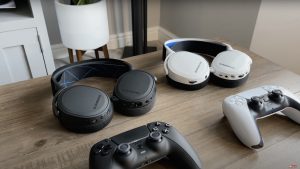
Using a headset while gaming can completely transform your gaming experience. Not only for chatting with friends or team mates, but hearing footsteps in FPS games or details in the soundtracks you might not hear through your TV or monitor.
Over the last few years I’ve used a lot of headsets, so here are my top recommendations if you’re wanting to pick a new one up.
If you’re on a budget, go for the Astro A10s. These are massively underrated for the price. They are wired so you just plug them into your controller, but it means no worrying about keeping it charged up for gaming. I recommend these to everyone and they come in at just £50 or $50. They will also work on anything with a 3.5mm headphone jack, so Xbox, Switch, PC or PlayStation.
Next up are the official PS5 Pulse 3Ds. These are available in white, as well as the new midnight black colour to match the controller. Personally I think these are one of the nicest looking headsets out there, really clean and the sound isn’t bad at all, plus they match the PS5 theme and style. These are £90 or $100 and although they are great, I think for the price there are better options available.
If you want the same great quality of the A10s but want to go wireless, the A20s are perfect for that. Make sure you get the Gen 2 though, they are the latest ones. They don’t look as aesthetically pleasing as the Pulse 3ds, but they certainly have a gaming style to them. These are only wireless and cannot be used wired. They come in at £100 and $120.
The final headset I wanted to recommend picking up has got to be the SteelSeries Arctis 7Ps. I’ve had these since launch for the PS5, and I’ve got to say they are incredible. They cost a little bit more at £175 or $, but they are worth it. They are available for the PS5, Xbox and PC.
Over 24 hours of battery and works with the PS5’s Tempest 3D audio. I’ve worn these for 10 hour sessions and never had an issue with them. So if you can, go for these. They are available in black or white, and they’ve just released the Plus model too.
Headset Stand
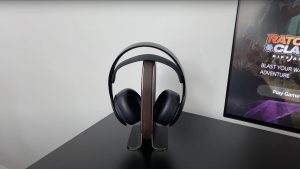
I like to show my headsets off on a Grovemade wooden stand, and I think it looks great. There are cheaper alternatives out there, I’ve looked around on Amazon and you can pick up a nice wooden or metal stand for sub £50. This one I have is £120 or $160, but it’s solid wood and wrapped in leather. It’s also really heavy.
Buy from here: USA / UK
Icons

If you’re an Xbox or PlayStation gamer like me, you might want to show that with some accessories on your desk or in the room. You can buy these LED lights for both consoles now which light up at the press of a button. They are battery or can be mains powered via a UBS. Or you can buy these wooden icons instead, I think these add a nice clean style without being too over the top. These were originally made for me as a custom order, but since then GeekMadeDesigns went onto selling them through their site.
OtterBox
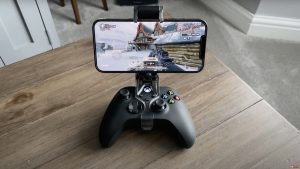
Next up is the OtterBox Gaming clip, and this could be one of my favourite accessories and actually the cheapest one. If you’ve got an Xbox controller already, you can mount it to your phone and use it for mobile gaming. I’ve got the original clip they made, but they’ve since done a magsafe version for iPhones.
This is awesome if you want to play some Xbox Cloud gaming or any mobile games on your phone. The controller connects via bluetooth so there aren’t any wires to worry about. This clip is £25 or $30.
Elgato

Although it’s possible to record gameplay on both consoles using the internal capture functionality, you might want to record it onto an external source. If you’ve got a PC or laptop, there are options like the Elgato 4K60 Pro but if you don’t have a PC, you can still do it. I’m using the 4K60 S+, which basically allows me to record my gameplay onto an SD card without the need for a PC nearby. It is limited to 4K 60, which is fine as you don’t need 4K 120 for uploading to YouTube anyway.
Depending on the model you go for, these vary in price from £130 up to £400, the £400 one being this 4K60 S+.
External Drives

Now I don’t know about you, but I can never have too much storage. Whether that’s backing up data or storing games, these little SSDs are perfect. I have one plugged into the Xbox Series X and another on the PS5 for the PS4 games I play. What’s great about these is they are incredibly small so you can’t really see them once you’ve plugged them in.
I have 7 of these now for various different uses ranging from 500GB and up to 2TB. I highly recommend these!